Introduction
LinkedIn Sales Navigator is a strong tool for finding the right prospects. It helps SDRs and outbound teams build targeted lead lists, research accounts, and focus on the people most relevant to a campaign.
But there is a practical gap between finding leads and using them in day-to-day outbound work.
That gap shows up when a team needs a more usable LinkedIn profile reference for spreadsheets, outreach prep, internal review, or CRM preparation. In many outbound workflows, a Sales Navigator lead link is fine for discovery, but less convenient for downstream work. The result is a repetitive manual process: open the lead, wait for the page flow, identify the public profile URL, copy it, paste it into a sheet, and repeat.
For a single lead, that may not feel like a major problem. For a live outbound team preparing dozens or hundreds of records, it becomes a real workflow bottleneck.
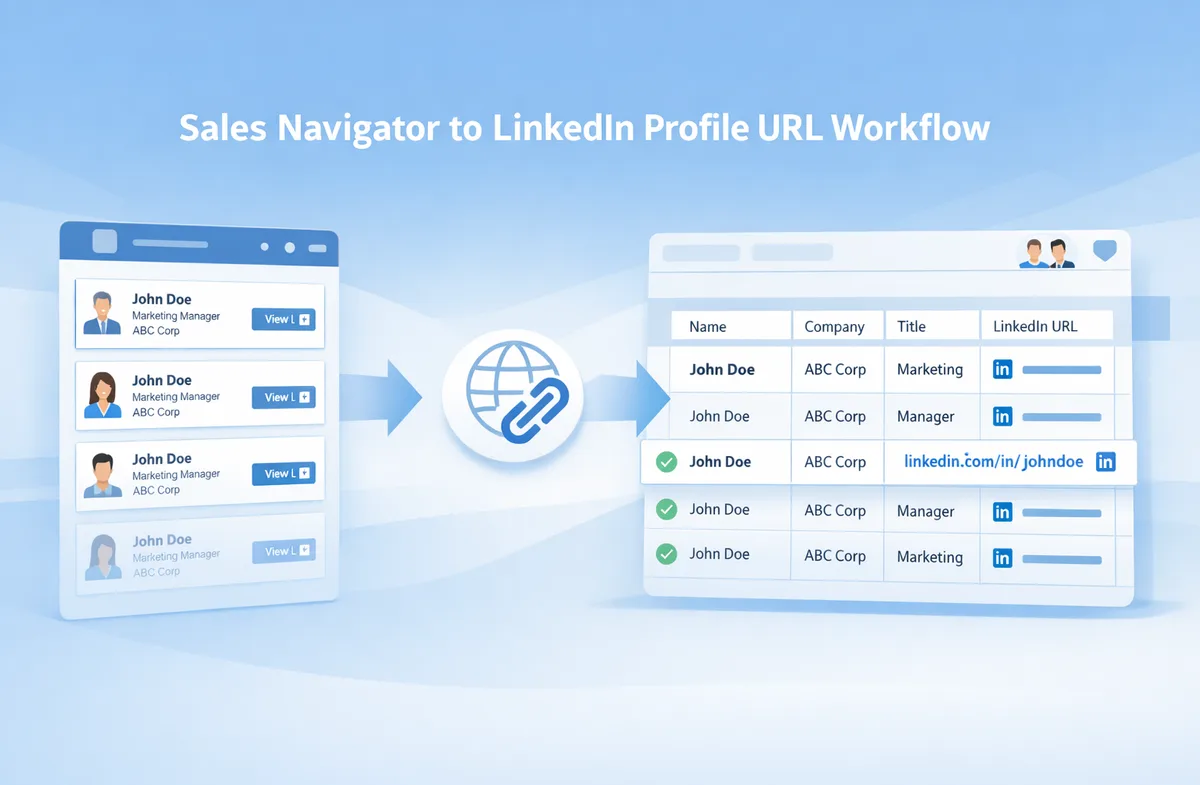
This guide explains what SDR teams usually mean when they talk about moving from a Sales Navigator link to a LinkedIn profile URL, where the workflow slows down, and how to build a cleaner process that supports faster list prep and smoother execution.
What SDR Teams Mean by “Sales Navigator to LinkedIn Profile URL”
When people search for “Sales Navigator to LinkedIn profile URL,” they are usually not looking for a technical novelty. They are trying to solve a workflow problem.
A Sales Navigator lead link is useful inside the Sales Navigator environment. It helps reps and researchers access the lead record they found during prospecting. But once that lead needs to move into a spreadsheet, a review sheet, a CRM-prep file, or an internal handoff document, the team often wants a simpler and more recognizable reference.
That is where a public LinkedIn profile URL becomes useful.
A public LinkedIn profile URL is often easier to:
- review quickly
- store in spreadsheets
- share internally
- use in outreach prep
- reference during QA or handoff
- include in a working file that multiple people touch
This does not make Sales Navigator less valuable. It simply reflects the reality that prospect discovery and downstream execution are not always handled in the same environment.
The goal is not to replace Sales Navigator. The goal is to make the output of Sales Navigator easier to work with once the sourcing step is done.
Where the Manual Workflow Slows SDR Teams Down
The problem with this workflow is not difficulty. It is repetition.
Opening one lead manually is easy enough. The pain appears when the same task has to happen over and over again across a real campaign.
A typical manual workflow looks like this:
- Build or collect a list of Sales Navigator leads.
- Open each lead individually.
- Wait for the page or redirect behavior.
- Identify the public LinkedIn profile URL.
- Copy that URL into a spreadsheet or tracker.
- Move to the next record and do it again.
This creates several issues.
First, it breaks momentum. SDRs and outbound operators often work best when they can move quickly through list prep, account review, and campaign setup. Repeated context switching between browser tabs and spreadsheets slows that down.
Second, it adds friction before outreach even starts. The team is spending time on mechanical record handling instead of qualification, personalization, messaging prep, or campaign review.
Third, it does not scale well. A repeated 10- to 20-second task can sound minor until it is multiplied across fifty, one hundred, or five hundred leads. At that point, the workflow cost becomes visible.
For outbound teams, this is one of those small operational tasks that quietly consumes time without adding much strategic value.
Why Outbound Teams Need Usable LinkedIn Profile URLs
Outreach Preparation
Before messaging begins, many SDR teams review lead lists, check title and company fit, add notes, and prepare personalization angles. A cleaner profile reference helps that process move faster.
Spreadsheet-Based Lead Management
A lot of outbound work still happens in spreadsheets, whether the team uses them for campaign planning, list QA, approvals, sequencing prep, or internal collaboration. Public LinkedIn profile URLs are often easier to sort, scan, and manage in those environments than Sales Navigator lead links.
Internal Handoffs
In many teams, the person sourcing leads is not the only person touching the list. Managers, sales ops, QA reviewers, and other reps may all need to work from the same file. A clearer profile reference makes that handoff easier.
CRM Preparation
Some teams also use a working sheet before records move into a CRM or related system. In that stage, the goal is usually not just data collection. It is making the record understandable, consistent, and easier to review before the next workflow step.
In all of these cases, the need is practical. Teams want a more workflow-friendly way to handle a lead record once it leaves the pure sourcing environment.
A Practical Workflow for Moving from Sales Navigator Lead Links to Usable Profile URLs
Step 1: Build the Lead List in Sales Navigator
Sales Navigator remains the sourcing environment. This is where the team identifies the right prospects by company, role, seniority, geography, and other filters.
Step 2: Move the Lead Links Into a Working File
Once the shortlist is ready, the links usually need to live somewhere the team can act on them. That may be a spreadsheet, a prep sheet, a campaign tracker, or an internal review document.
At this point, the team should also standardize a few core columns such as name, company, role, owner, campaign, and notes.
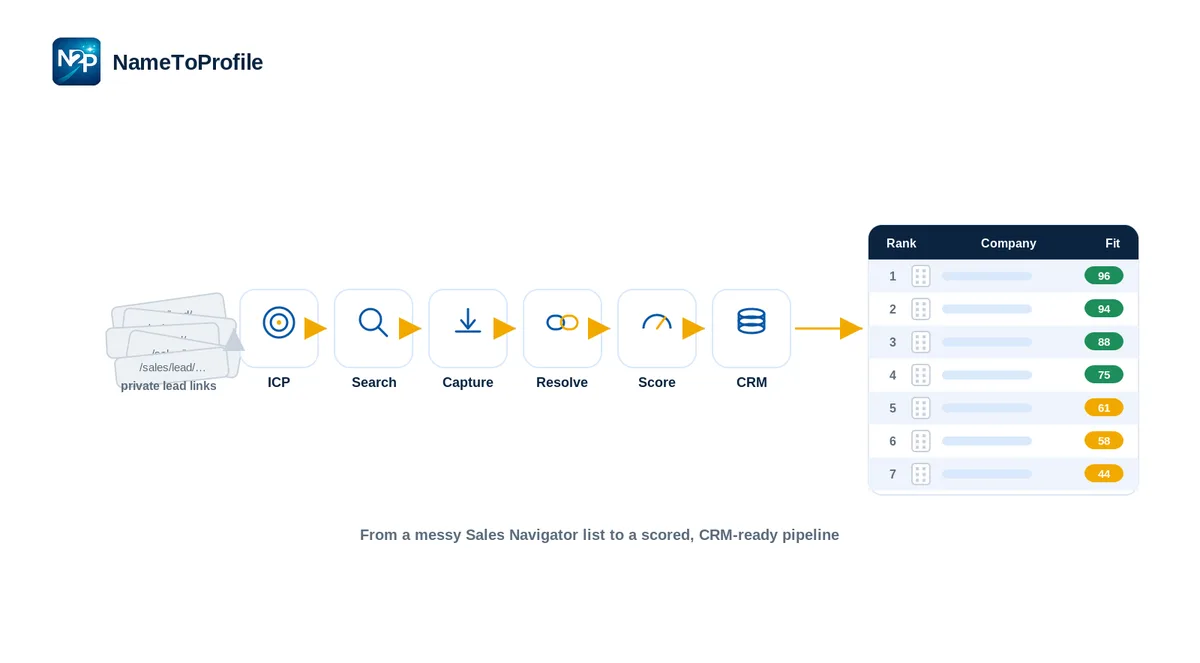
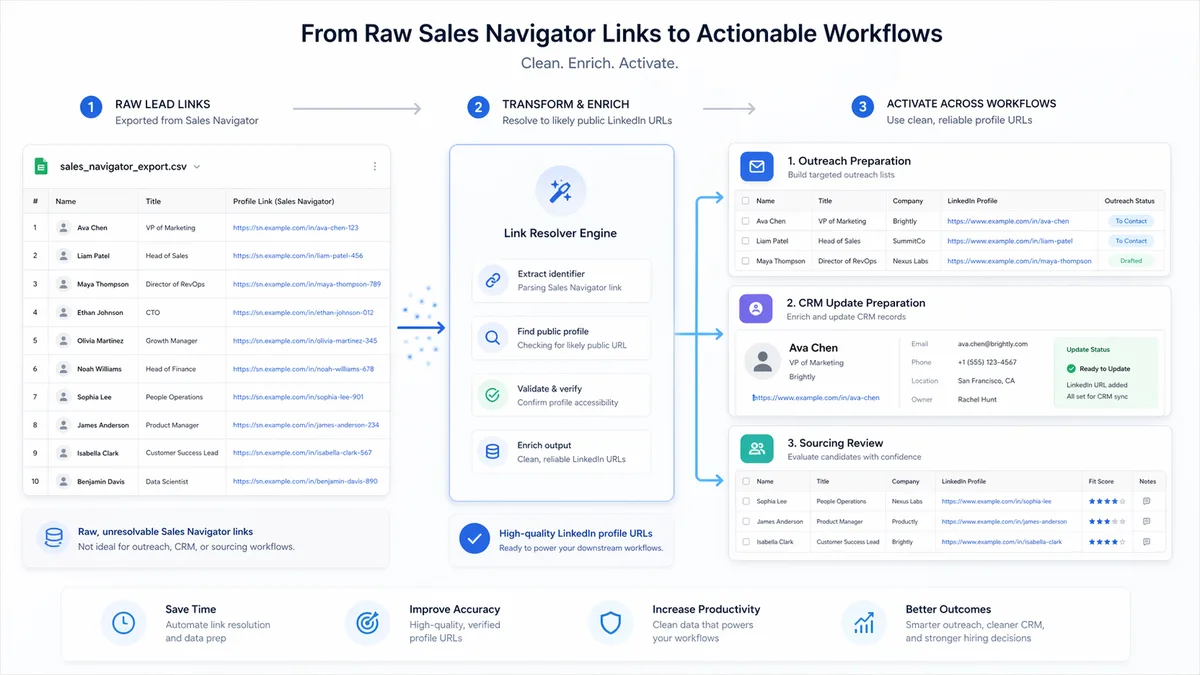
Step 3: Resolve Lead Links Into Likely Public LinkedIn Profile URLs
This is the part many teams still handle manually. Instead of opening records one by one, a structured process helps generate likely public LinkedIn profile URLs in a more repeatable way.
The key phrase here is “likely public LinkedIn profile URLs.” Teams should avoid treating every output as an absolute certainty. In larger workflows, careful review still matters where results are less clear.
Step 4: Review and Flag Uncertain Records
A good workflow leaves room for human review. That is especially useful when a team is processing many records at once. Some results can move forward quickly, while lower-confidence records can be checked before they are used downstream.
Step 5: Use the Cleaned List for Outreach Prep and Handoff
Once the list is cleaned up, the team has a more usable working file for messaging prep, approvals, collaboration, or campaign execution.
At that point, the benefit is not just the URL itself. The benefit is a smoother outbound workflow.
Manual Workflow vs Structured Workflow
Not every team needs the same level of process.
For a small one-off task, manual handling may be completely fine. If a rep only needs to check a handful of records, opening them individually may not be worth optimizing.
But once the work becomes recurring, the math changes.
A structured workflow becomes more valuable when:
- the team handles larger lead volumes
- campaign prep happens every week
- multiple people touch the same list
- spreadsheets are central to the workflow
- consistency matters across client or internal delivery
This is also where batch handling becomes more important. A structured process is usually less about “automation for its own sake” and more about reducing repeated low-value effort.
For SDR teams, that matters because list prep is rarely the end goal. The real objective is getting from sourced lead to outreach-ready record with less friction.
Where NameToProfile.com Fits Into This Workflow
NameToProfile.com fits into this process as a focused workflow utility.
Its role is not to replace Sales Navigator or act as a complete outbound platform. Its role is narrower and more practical: it helps teams convert LinkedIn Sales Navigator lead links into likely public LinkedIn profile URLs so those records are easier to use in downstream workflows such as spreadsheets, outreach prep, CRM preparation, and internal collaboration.
That matters because the real value is not just “link conversion.” The value is reducing the repeated open-copy-paste workflow that slows teams down when list volumes grow.
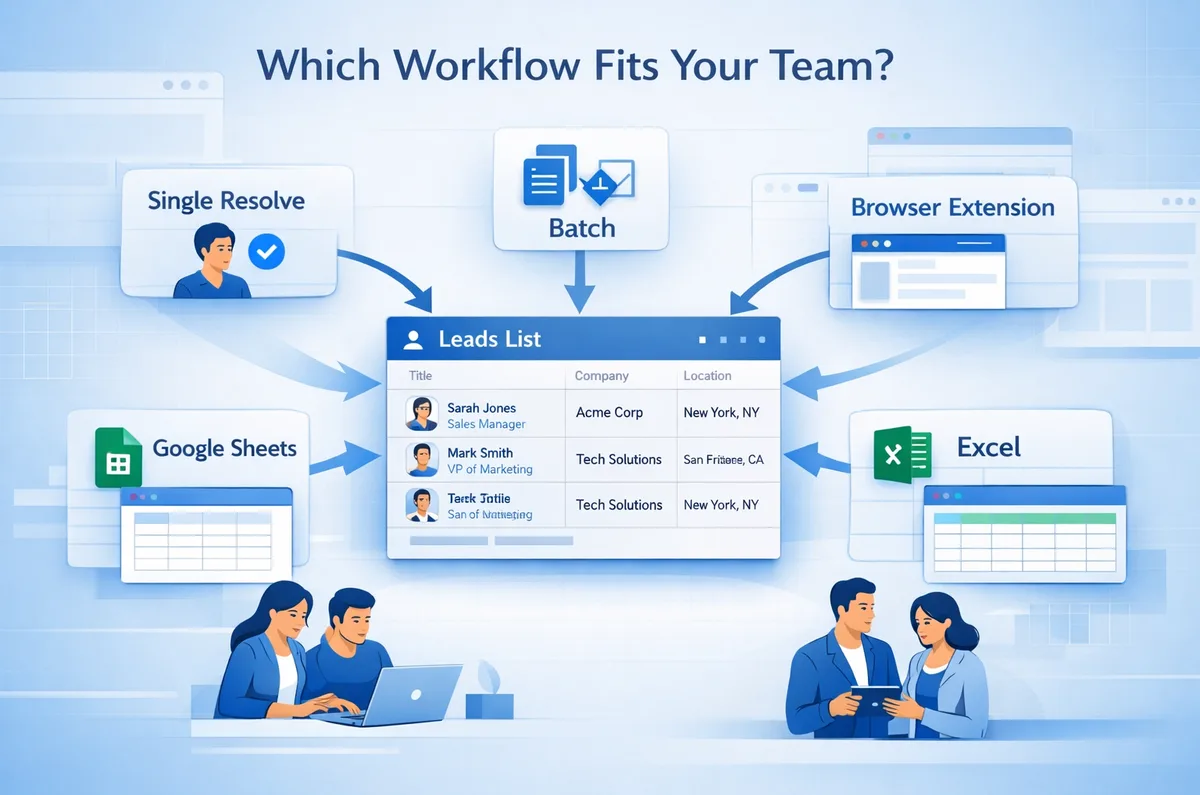
For SDR and outbound teams, that can be useful in several environments:
- single-record checks for quick verification
- batch workflows for larger lead lists
- browser-based workflows for live prospecting
- Google Sheets workflows for shared list handling
- Excel workflows for ops-heavy teams
Where relevant, a confidence score can also help teams decide which records may need additional review rather than treating every result the same way.
The product fits best when the team already understands the pain of manual lead-link handling and wants a more operationally usable process around that step.
Best Practices for SDR and Outbound Teams
Keep the Working File Review-Friendly
Do not treat the list as a dump of raw sourced records. Structure it so another person can understand it quickly.
Standardize Key Columns
A clean outbound sheet usually includes fields like name, company, role, owner, campaign, notes, source link, and resolved profile URL. That makes review and handoff much easier.
Separate Clean Records From Review-Needed Records
If some results are more certain than others, do not force them all through the same process. Let the easy records move forward and flag the rest for validation.
Optimize Before Outreach Starts
The more friction that stays in the list-prep stage, the more it leaks into messaging, QA, and execution. Clean records early.
Build for Team Handoff, Not Solo Use
A workflow that only makes sense to the person who built it is fragile. Outbound systems work better when the next person can pick up the file without confusion.
Common Mistakes to Avoid
One common mistake is treating profile URL conversion as if it were the whole job. It is not. It is one step inside a broader outbound workflow.
Another mistake is letting link formats stay inconsistent across sheets and teams. That creates confusion later when records are reviewed, reassigned, or prepared for the next system.
A third mistake is staying manual for too long. Teams often tolerate repetitive list handling because each individual action seems small. But the cost compounds quickly when the workflow repeats every week.
Finally, teams sometimes skip the review layer entirely. Even when a workflow is faster, it is still worth keeping a measured approach and checking uncertain results where needed.
Conclusion
For SDR and outbound teams, the real challenge is not finding leads. It is turning sourced leads into records that are actually ready for action.
That is why the path from a Sales Navigator lead link to a usable LinkedIn profile URL matters. It sits in the middle of a larger process that affects spreadsheet usability, outreach prep, internal handoffs, and overall execution speed.
When handled manually, this step becomes repetitive and hard to scale. When handled with a cleaner workflow, it becomes much easier to move from sourced list to outreach-ready file.
That is the practical takeaway: this is not just about converting one URL format into another. It is about removing unnecessary friction from outbound operations.
Want to resolves Sales Navigator lead URLs into likely public profile URLs?
If your team regularly works through Sales Navigator lead lists and needs more usable LinkedIn profile URLs for outreach prep, spreadsheets, or internal handoffs, NameToProfile.com is a practical way to reduce the repetitive manual work in that process. It fits best for teams that already use Sales Navigator and want a cleaner workflow around the records they already manage. Start Free