Finding leads or candidates is only one part of the job.
For many teams, the real friction starts after discovery. A list may already exist in Sales Navigator, but the records are not yet in a format that feels easy to use in spreadsheets, internal review files, outreach prep, or CRM-related workflows. That is where repetitive work begins.
Someone has to open lead links one by one, wait for the page behavior, identify the public LinkedIn profile URL, copy it, and paste it into the next system or working file. A single record is manageable. A recurring workflow across dozens or hundreds of records is where the process becomes slow, distracting, and hard to scale.
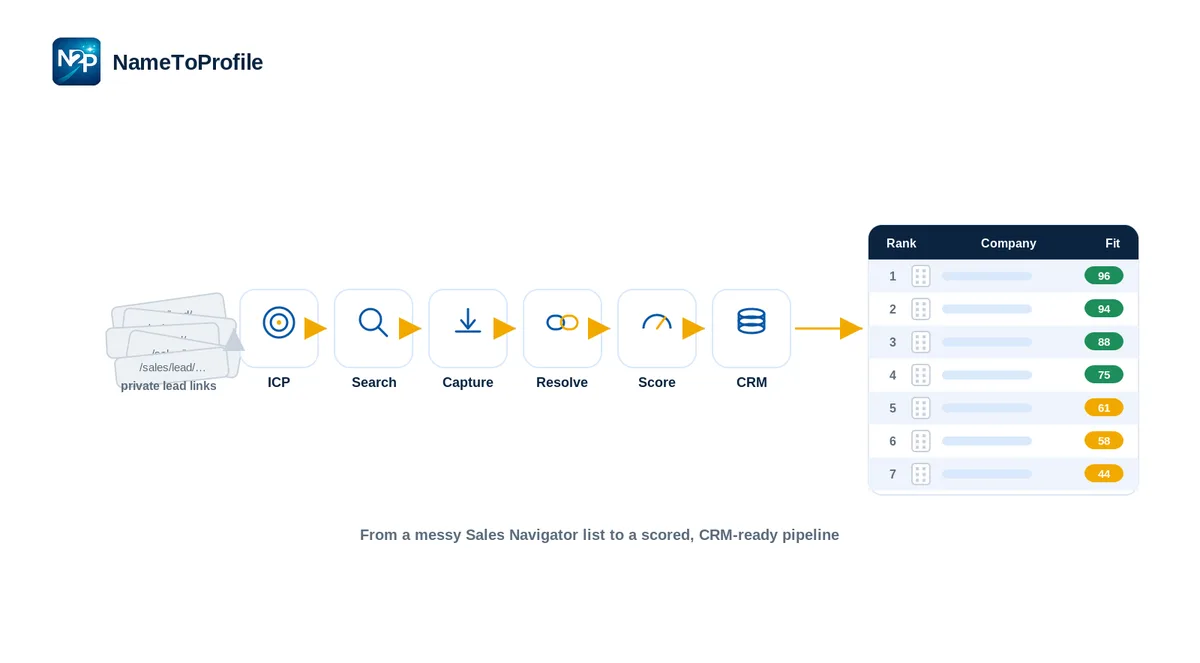
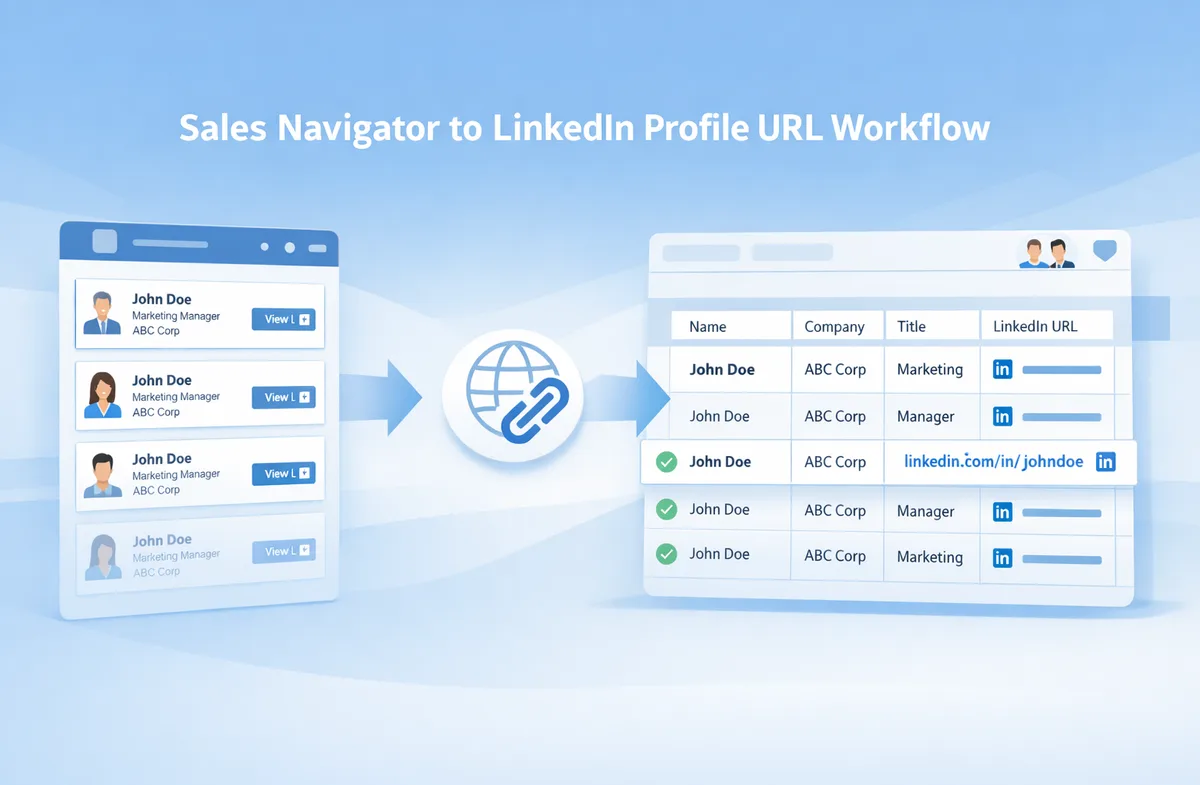
This is the practical gap that NameToProfile is built to help with. It converts LinkedIn Sales Navigator lead links into likely public LinkedIn profile URLs so teams can work with a more usable output before the next step in the workflow. The value is not “link conversion” in the abstract. The value is removing repetitive manual work that sits between lead discovery and downstream execution.
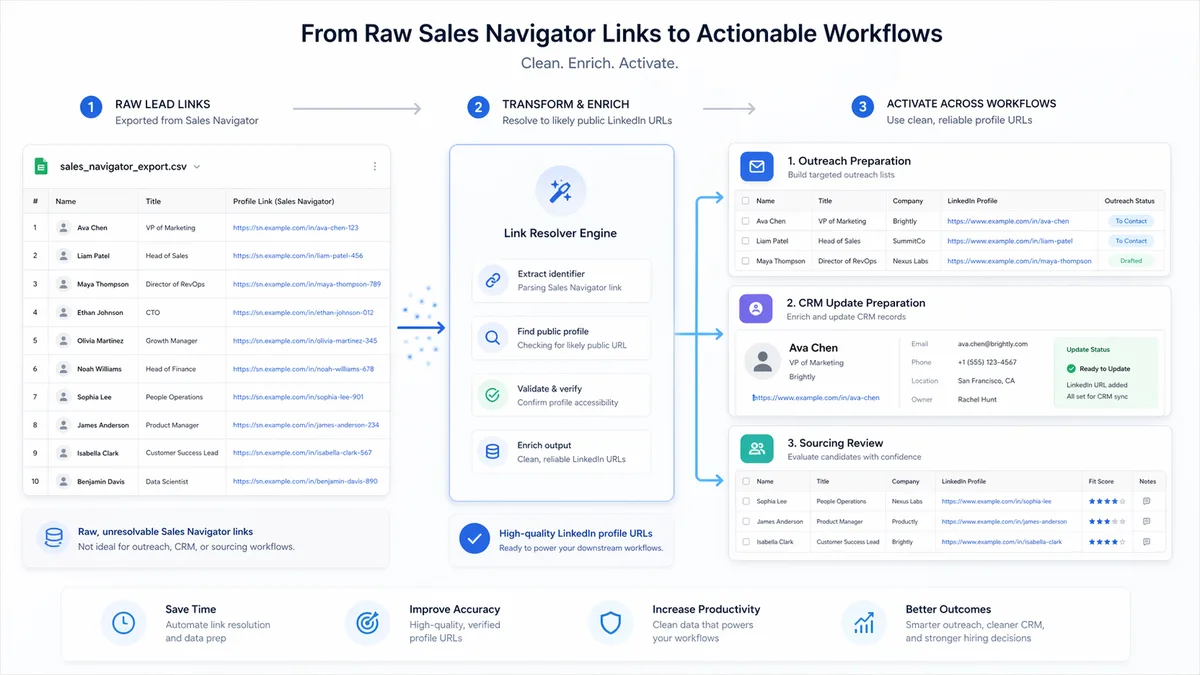
In practice, that makes NameToProfile relevant in three common moments: before outreach starts, before teams prepare records for CRM work, and before sourcing lists are shared or reviewed internally.
The workflow problem starts after lead discovery
Sales Navigator can be effective for finding people. But finding people is not the same as preparing a clean, workflow-ready list.
Teams often assume the hardest part is prospect discovery. In reality, a lot of time disappears in the transition from “we found the right people” to “this list is usable by the next person or process.” That transition usually includes list cleanup, spreadsheet formatting, handoffs, internal review, outreach preparation, and sometimes CRM preparation.
This is why link format matters more than it may seem at first. Sales Navigator lead links are useful within their original environment, but they are often less convenient when teams want to organize records in spreadsheets, share them with teammates, include them in working documents, or prepare them for other operational steps. Public LinkedIn profile URLs are often easier to read, store, review, and pass between people and systems.
That does not mean a public URL solves everything. It means it is often a more practical reference point for the everyday work that happens after a lead or candidate has already been identified.
Why Sales Navigator lead links create friction in real workflows
The friction usually does not come from complexity. It comes from repetition.
Opening one lead manually is easy. Opening many leads, waiting for the page flow, checking the corresponding profile, copying the usable URL, and repeating that pattern over and over is where the drag shows up. Teams lose momentum because simple administrative work keeps interrupting higher-value tasks like qualification, personalization, candidate review, messaging strategy, and collaboration.
This friction tends to show up in a few predictable places:
- Lead lists that need to be cleaned before outreach
- Spreadsheets that need more usable profile references
- Handoff files that need to make sense to other teammates
- Sourcing lists that must be reviewed by hiring managers
- CRM preparation workflows that need cleaner inputs before the next step
NameToProfile fits into this part of the process by helping teams convert Sales Navigator lead links into likely public LinkedIn profile URLs in a more structured way. That makes the output easier to use in downstream workflows without forcing the team to do the same open-copy-paste task manually for every record.
Where NameToProfile fits in the workflow
NameToProfile is best understood as a workflow utility, not an all-in-one sales or recruiting platform. It is also not a replacement for Sales Navigator. It supports teams that already use Sales Navigator and need a more usable output for the next stage of work.
Its role is narrow but useful.
A team starts with Sales Navigator lead links. NameToProfile helps produce likely public LinkedIn profile URLs from those inputs. Those outputs can then be used in spreadsheets, outreach preparation files, internal review sheets, CRM preparation workflows, and collaboration documents where a more readable and reusable profile reference is helpful.
That is why the product should be positioned around workflow efficiency. It helps teams reduce repetitive manual work, structure lead data for downstream use, and make lists easier to review and share. It should not be positioned as bypassing LinkedIn, avoiding restrictions, or making exaggerated certainty claims. Careful phrasing matters here, including the use of “likely public LinkedIn profile URL” rather than absolute language.
How SDR and outbound teams use NameToProfile before outreach
For SDRs and outbound teams, the most obvious use case is pre-outreach list preparation.
Before a campaign launches, teams often need to review the target list, organize it by owner or segment, add notes, prepare personalization context, and make sure the working sheet is clear enough for execution. If the list contains Sales Navigator lead links, someone may still need to stop and manually turn those into a more convenient reference format before the campaign really feels ready.
NameToProfile helps at this stage by making profile references easier to work with before messages are written or sequences are assigned. A likely public LinkedIn profile URL can be easier to inspect in a working file, easier to share with a manager during list review, and easier to keep beside fields like name, role, company, notes, and campaign owner.
Cleaning lead lists before campaign launch
Many outbound teams build lists in phases. First comes targeting. Then comes review. Then comes outreach prep.
The cleanup phase is often where manual link handling becomes a bottleneck. If each row still needs a more usable LinkedIn reference, the team can lose time before the campaign even starts. NameToProfile helps remove one of those repetitive prep steps so the list is easier to finalize.
Supporting personalization and account research prep
Before outreach, SDRs may need quick access to profile context during research and message drafting. A cleaner profile reference in the working file can make that process less awkward than relying only on Sales Navigator-specific links. The value here is not magic personalization. It is smoother preparation and less back-and-forth during the setup phase.
Improving handoffs between reps, managers, and support roles
In some teams, one person builds the list and another person reviews or executes it. Public-profile-style output is often easier for the receiving person to understand at a glance. That can improve handoff quality before outreach begins.
How RevOps and sales ops teams use NameToProfile before CRM updates
RevOps and sales ops teams usually care less about a single link and more about the consistency of the workflow around it.
These teams are often responsible for making prospecting processes more repeatable, more standardized, and easier for others to execute. When inputs are awkward to handle, process quality drops. Manual work gets pushed onto reps or coordinators, execution becomes inconsistent, and internal sheets become harder to maintain.
This is where NameToProfile fits well as an upstream utility before CRM-related work happens.
Standardizing lead references in working sheets
A common operations task is cleaning and organizing lead data before it moves further downstream. Public LinkedIn profile URLs are often easier to review, validate, and store in shared sheets than Sales Navigator lead links. For teams working in spreadsheet-based processes, that small difference in usability matters.
Improving pre-import review and record preparation
A list is not CRM-ready simply because it contains names and companies. Teams often need to review structure, remove ambiguity, and make sure records are easy for the next step in the process. NameToProfile can support this preparation phase by making LinkedIn-related references more usable before import, enrichment, or handoff.
Supporting cleaner internal process design
Operations teams benefit when low-value manual tasks are removed from recurring workflows. If reps or assistants no longer need to manually open and copy each link during preparation, the process becomes easier to document and easier to repeat. That is the real operational value: less friction in everyday execution.
How recruiters and sourcing teams use NameToProfile
Although the product has obvious sales workflow relevance, it is not only useful for sales teams. Recruiters and sourcing teams face many of the same operational issues when they begin with Sales Navigator lead links and need a cleaner working file for review and collaboration.
In recruiting workflows, the problem is often not “can we find the person?” It is “can we prepare a shortlist that is easy to review, discuss, and share?”
Preparing candidate lists for review
Recruiters often work through shortlists, trackers, and sourcing spreadsheets. When a candidate list is easier to read and organize, it becomes easier to move from sourcing to actual review. A likely public LinkedIn profile URL can be more practical in that environment than a Sales Navigator-specific link.
Making sourcing files easier to share with hiring teams
Hiring managers and collaborators may not want to work from Sales Navigator lead links inside a sourcing file. A more usable public-profile-style reference can make review sheets feel clearer and easier to act on. That improves the handoff between sourcing and stakeholder review.
Reducing repetitive admin work in shortlist preparation
Sourcing teams often balance research with a surprising amount of admin work. When people have to confirm profiles and copy links manually across many candidates, that admin layer becomes a time sink. NameToProfile helps remove some of that repetition so the team can spend more time on candidate quality and collaboration.
How agencies use NameToProfile across client delivery workflows
Lead generation agencies often feel this problem early because they handle recurring list work across multiple accounts.
They may collect prospects in Sales Navigator, but the final output still needs to be useful for internal QA, account management, client review, and delivery. If the list remains tied to awkward lead links, the file is harder to operationalize and harder for others to work with.
NameToProfile can help agencies in three practical ways.
Preparing cleaner prospect files for handoff
Client-facing spreadsheets and internal delivery files benefit from more readable, more reusable profile references. The goal is not cosmetic. It is to make the file easier for the next person to understand and use.
Improving QA and internal review
Agencies often have multiple people involved in list creation, review, and delivery. Cleaner profile references help each stage move more smoothly because the list is easier to inspect and discuss.
Making LinkedIn-related references easier for clients to use
Clients, account managers, and internal stakeholders often prefer files that are easy to navigate and interpret. When NameToProfile helps produce more workflow-friendly LinkedIn references, the final handoff becomes more polished and more practical.
Supporting spreadsheet-based workflows at scale
A major reason NameToProfile is useful is that many real-world teams do not work entirely inside one platform. They work in spreadsheets.
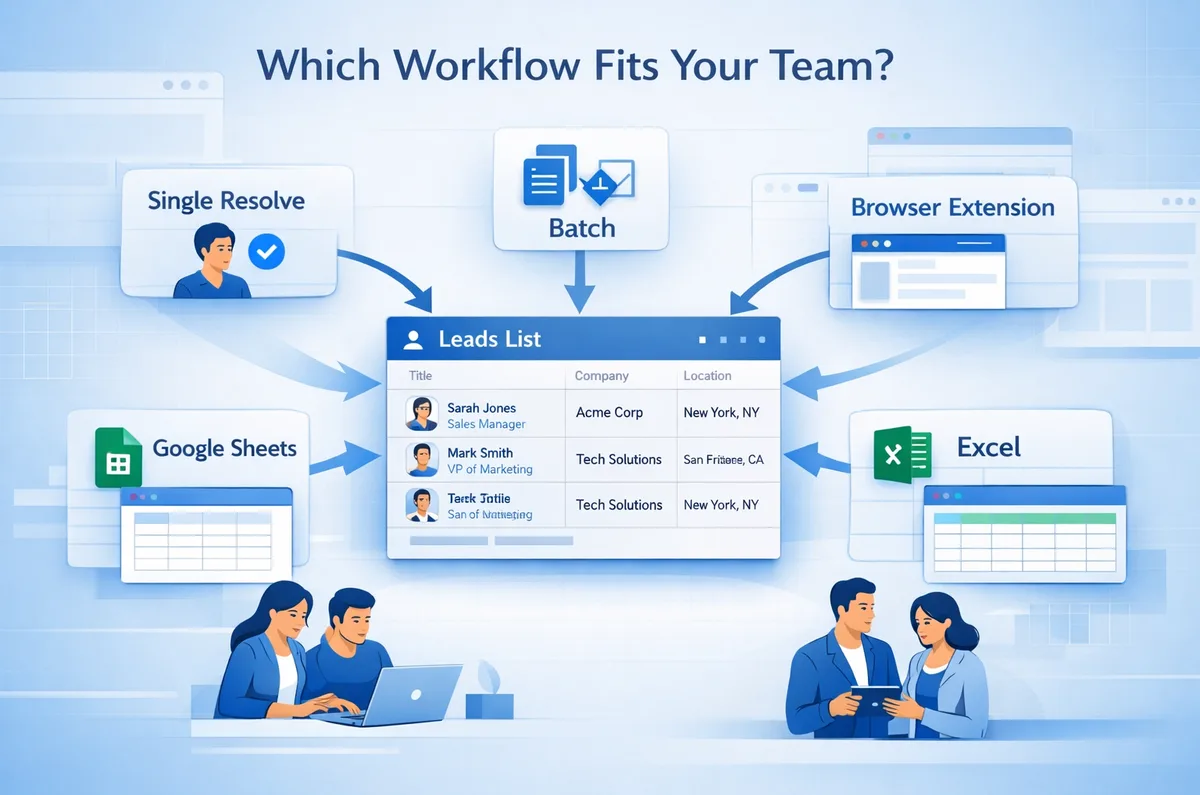
Google Sheets and Excel remain common operating environments for list building, review, QA, campaign planning, candidate tracking, and internal approvals. When a team is already living inside a sheet, constantly jumping out to resolve links manually is disruptive. NameToProfile supports spreadsheet-based workflows through its Google Sheets add-in and Excel add-in, making it easier to work where the team already operates.
This becomes more important as volume grows.
A few manual lookups might be tolerable. Repeated manual lookups across large lists quickly become operational drag. That is why batch workflows matter. The business value becomes clearer when teams are handling recurring lead-processing tasks rather than isolated one-off checks. NameToProfile supports both single resolve and batch resolve, which gives teams flexibility depending on the volume and context of the work.
The confidence score also matters in larger workflows. It should be described carefully as a decision-support signal, not a guarantee. In practice, it helps teams sort or review outputs with more context, so higher-confidence results may move forward faster while lower-confidence results can receive more manual attention.
What this workflow improvement does and does not do
The best way to describe NameToProfile is as a focused workflow improvement.
It helps teams:
- Convert Sales Navigator lead links into likely public LinkedIn profile URLs
- Reduce repetitive manual work
- Prepare lists for outreach, CRM prep, sourcing review, and internal collaboration
- Improve spreadsheet usability and handoff quality
- Support more scalable processing through batch and spreadsheet workflows
It does not replace prospecting strategy, CRM systems, or sourcing judgment. It is also not something that should be framed as bypassing LinkedIn, avoiding restrictions, or guaranteeing perfect results. The safest and most accurate positioning is workflow efficiency: helping teams work faster and more cleanly with lead data they already manage.
That distinction is important because good B2B workflow tools do not need hype to be useful. Sometimes the strongest value comes from removing a small but recurring bottleneck that keeps interrupting the real work.
Conclusion
Teams do not usually struggle because they cannot find leads or candidates. They struggle because the path from “we found them” to “this record is ready for the next step” is often more manual than expected.
That gap shows up before outreach starts, before CRM preparation happens, and before sourcing files are shared internally. In each of those moments, NameToProfile helps by turning LinkedIn Sales Navigator lead links into likely public LinkedIn profile URLs that are easier to use in spreadsheets, review files, handoffs, and workflow preparation.
The product works best when it is understood as a practical workflow layer. Not a replacement for Sales Navigator. Not an all-in-one sales platform. Just a focused tool that removes repetitive manual work and makes downstream execution easier to manage.
Want to resolves Sales Navigator lead URLs into likely public profile URLs?
If your team already uses Sales Navigator and still spends too much time preparing records for outreach, CRM-related work, or sourcing review, NameToProfile can help reduce that repetitive manual step and make the next stage of the workflow easier to handle. Start Free