Building a LinkedIn lead list is easy to describe and much harder to do well.
On paper, the task sounds simple: define your target audience, find relevant people, export the list, and hand it to the outreach team. In practice, that is where many teams run into friction. A list may have names, job titles, and companies, but still be awkward to use because it is missing one of the most practical fields in downstream execution: a verified public LinkedIn profile URL. That is exactly the problem NameToProfile’s lead list building service is designed to solve.
That matters because a lead list is not valuable just because it exists. It is valuable when your SDRs, agencies, or ops team can actually use it without doing another round of manual cleanup. The real workflow problem is that teams lose time when they have to open leads one by one, identify usable profile references, and manually prepare records for spreadsheets, CRM prep, outreach prep, and internal collaboration.
Why Lead List Building Is More Than Just Finding Names
A raw prospect list and an outreach-ready prospect list are not the same thing.
Many teams stop too early. They gather names, companies, titles, and maybe geography, then assume the work is done. But that list still has to move through real operating workflows. Someone has to review it, load it into an outreach tool, use it in personalization research, attach it to CRM preparation, or hand it off to another team.
That is where link quality becomes important. Most lead lists fall short because the data is not fully actionable. If SDRs do not have usable LinkedIn profile URLs, the next stage of the workflow becomes slower and more manual.
The core value here is not “URL conversion” by itself. The real value is removing repetitive manual work from list preparation and making lead data more operationally useful at scale.
Why Verified Public LinkedIn Profile URLs Matter
A verified public LinkedIn profile URL is useful because it is easier to work with across teams and systems than a Sales Navigator lead link alone.
Easier Review and Handoff
When one team builds lists and another team executes outreach, messy or incomplete profile references create rework. A cleaner public profile URL makes the record easier to inspect and easier to pass between researchers, SDRs, managers, clients, and ops stakeholders.
Better Fit for Spreadsheets and CRM Prep
A usable public profile URL is easier to store in CSV or Excel files, reference in list QA, and keep alongside fields like company, title, geography, and notes. That makes the list more practical for operational use.
Faster Outreach Preparation
Before outreach starts, teams usually need to confirm context, assign owners, review segments, and sometimes personalize messaging. If the list already contains verified public profile URLs, the receiving team can work from a cleaner file instead of manually looking up each lead again.
What a Usable LinkedIn Lead List Should Include
A good list should not just be long. It should be usable.
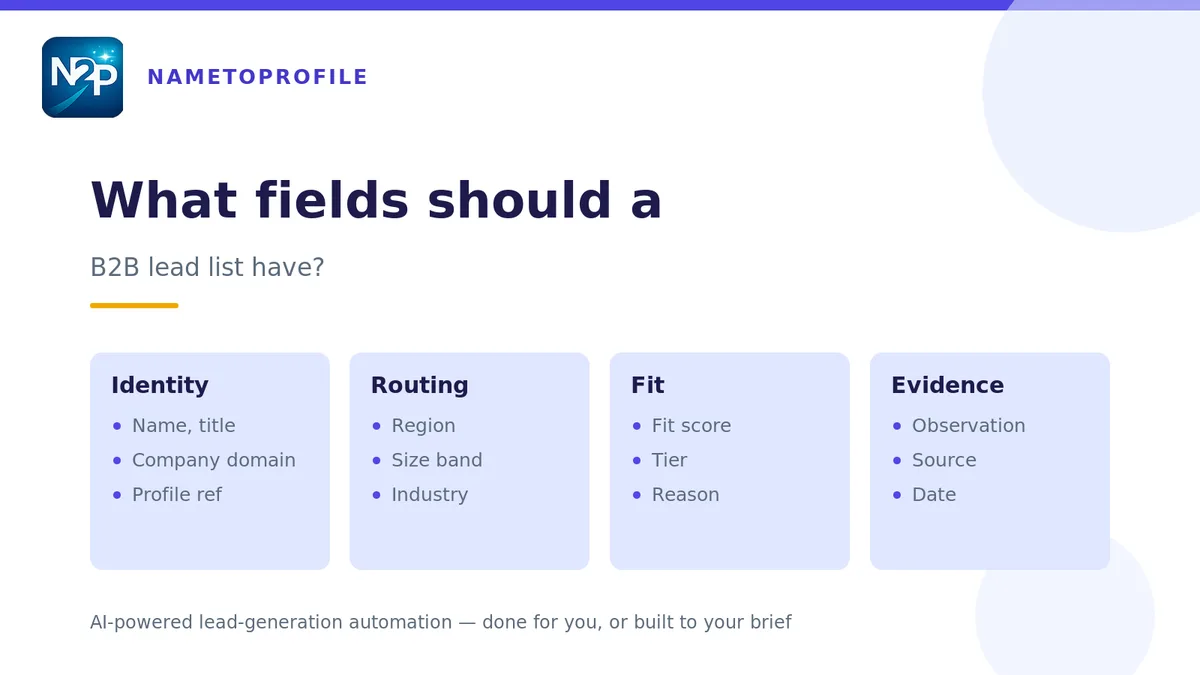
A strong outreach-ready file typically includes first name, last name, job title, company name, company size, industry, verified public LinkedIn profile URL, and location. In some workflows, it can also include company LinkedIn page URL, company website, generic company email, direct business email, or company switchboard phone.
Structured CSV or Excel delivery matters because the next team should be able to filter, sort, review, import, and act on the file without extra formatting work.
A practical way to think about it is this: a list becomes useful when the next team does not need to fix it first.
How LinkedIn Lead List Building Typically Works
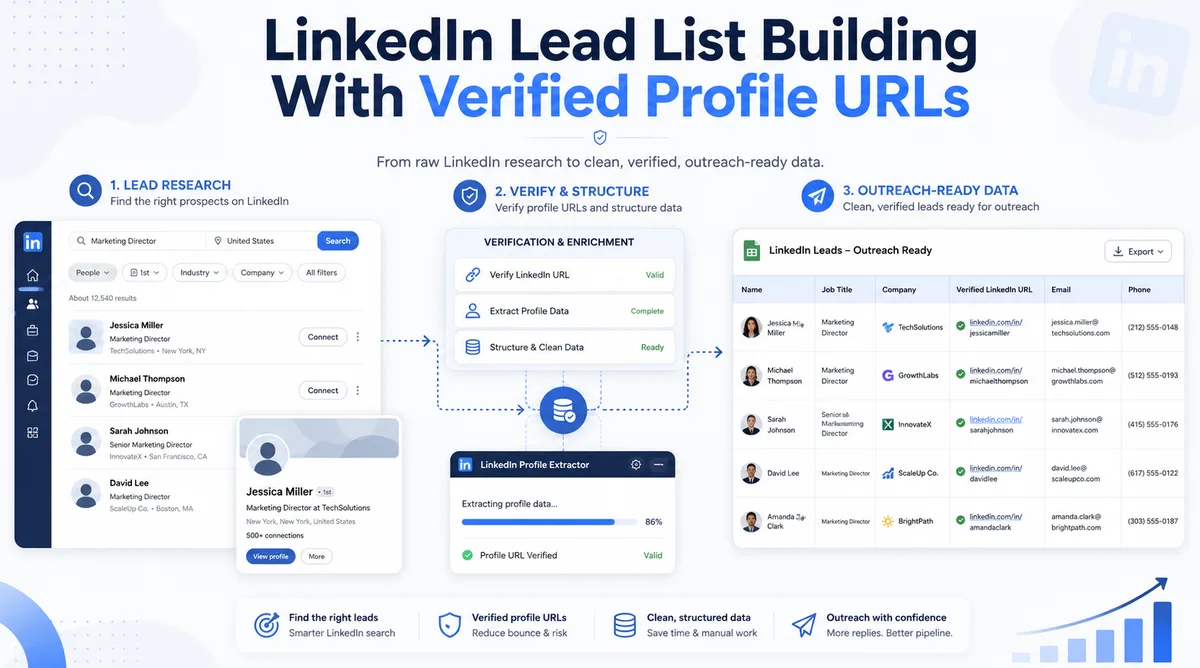
A practical lead list building workflow usually follows four steps.
1. Define ICP and Targeting Criteria
Start by defining job titles, industries, company sizes, geographies, account types, and exclusions. The clearer the targeting criteria, the cleaner the final list.
2. Source Prospects in Sales Navigator
Use LinkedIn Sales Navigator to identify people who match the targeting criteria. This is often the strongest starting point for B2B prospect discovery, but it is only the beginning of the workflow.
3. Resolve and Verify Public LinkedIn Profile URLs
Once prospects are identified, the next step is turning those lead references into verified public LinkedIn profile URLs that are easier to use in downstream work.
4. Deliver an Import-Ready File
The final output should be a structured CSV or Excel file that can move directly into outreach tools, internal spreadsheets, CRM prep, or handoff workflows.
Common Mistakes Teams Make When Building Lead Lists
Treating List Creation as Finished Too Early
A researcher may feel done once the right names are found, but the execution team still inherits a manual workload if the file is not properly structured.
Leaving SDRs to Manually Look Up Profile URLs
Manually opening records one by one is not hard, but it is repetitive, slow, and disruptive when repeated across dozens or hundreds of leads.
Sending Messy Files That Create Extra Ops Work
This usually shows up as inconsistent columns, weak handoff fields, missing profile references, or too much work left for the next person in the process.
Two Ways Teams Can Solve the Workflow Problem
1. Use a Done-for-You Lead List Building Service
This is the better option when you want a completed file delivered around your ICP and campaign criteria. A done-for-you workflow makes sense for agencies building client lists, SDR leaders launching campaigns, and sales teams that want an outreach-ready output without absorbing the internal prep work themselves.
2. Use Tools That Speed Up Internal List Preparation
This is where the new LinkedIn Profile Extractor extension fits naturally. It supports structured profile exports in JSON, CSV, or Excel, which is useful for teams that want more control over their own list-building workflow.
The extension can help users capture LinkedIn profile data in a structured format, select which sections to include, and export profile information in a way that supports spreadsheet-based operations and internal review.
For higher-volume workflows, the extension’s bulk capture capability adds another practical option for teams that want to collect multiple profile records into a single export session.
Where NameToProfile Fits
NameToProfile is best understood as workflow infrastructure for teams that already use LinkedIn and Sales Navigator and want cleaner downstream execution.
The lead list building service is the right fit when you want a targeted prospect file delivered with verified public LinkedIn profile URLs and optional business contact channels in an import-ready format. The extension is the right fit when your team wants to capture and structure profile data itself in JSON, CSV, or Excel, including bulk exports.
Together, they support the same broader outcome: reducing repetitive manual work and making lead data more usable in real operating workflows.
How Agencies, SDR Teams, and Ops Leaders Benefit
Agencies Preparing Client-Ready Files
Lead generation agencies often need to deliver clean, professional files to clients. Verified public profile URLs make those files easier to review and easier to use.
SDR Teams Launching Campaigns Faster
SDR teams benefit when prospect data is already structured for execution. That reduces the time spent on prep and increases the time available for research, messaging, and outreach.
RevOps Teams Improving List Quality and Consistency
RevOps and sales ops teams care about cleaner inputs, more consistent files, and less repetitive manual handling. Verified profile URLs support those goals by making lead records easier to standardize and review.
Conclusion
Better lead list building is not really about exporting more names. It is about producing a file your team can actually use.
That is why verified public LinkedIn profile URLs matter. They make lists easier to review, easier to hand off, easier to work with in spreadsheets, and easier to prepare for outreach and CRM workflows.
If your current list-building process still leaves SDRs or ops teams doing manual cleanup, the bottleneck is probably not lead discovery. It is workflow readiness.
CTA
Need a lead list your outreach team can use immediately?
NameToProfile’s LinkedIn Lead List Building service helps you build targeted prospect lists and append a verified public LinkedIn profile URL for every lead, with structured CSV or Excel delivery and optional business contact channels.
For teams that prefer a self-serve workflow, the LinkedIn Profile Extractor extension gives you structured JSON, CSV, and Excel exports, plus bulk capture for multi-profile sessions.