Roughly 2 to 3% of your contact records go stale every month, which is 25 to 30% a year, and job titles and direct dials decay fastest. That number is the reason lead profiling tools exist, and it is also the reason most comparisons of them are useless: they rank features on a clean record, when the whole job happens on a messy one.
This is not a list of ten tools. It is the four things a lead profiling tool has to do before it saves you any time at all, and the one step where almost every tool quietly hands the work back.
What a lead profiling tool is actually for
Profiling is the step between "I have a list" and "I can decide who to contact". You start with a name and a company. You need enough structured detail to answer one question: does this account look like the accounts we win?
Everything else is downstream of that. Routing, sequencing, territory planning and scoring all assume the profile is already there and already correct. So a profiling tool is not a research assistant. It is the thing that turns a row into a decision, several hundred times, without a person reformatting anything.
The four things it has to do
1. Return the fields you score on, not the fields it has
Most tools return what they hold and leave you to map it. That sounds like a small inconvenience until you count it: a mapping step that takes ninety seconds per batch, run twice a week, is most of a day a quarter.
The test is simple. Write down the five attributes you actually score fit on. Not the twenty you would like, the five that change whether a rep calls. Then ask whether the tool returns those five, named that way, without a transformation. If the answer is "it returns forty fields and you can pick", the picking is your job and it never stops being your job.
2. Survive the messy record
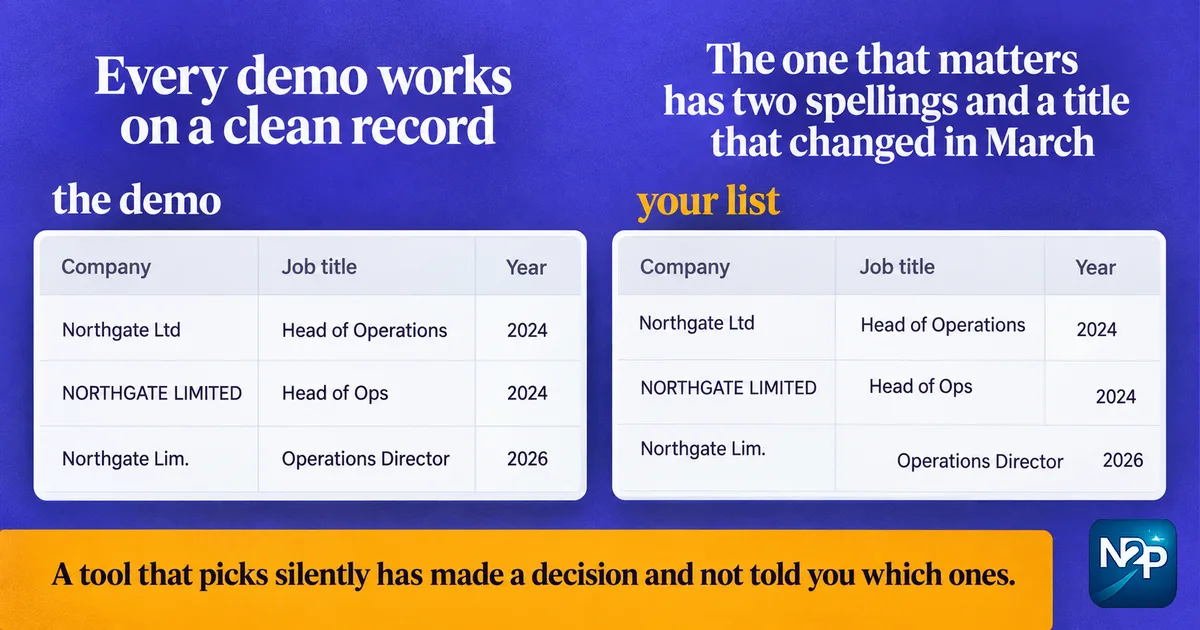
Every demo works on a clean one. The record that matters has two spellings of the same company, a title that changed in March, and a near-duplicate already sitting in your CRM under a different owner.
What the tool does at that moment is the whole difference between saving an hour and creating one. Specifically: does it tell you it was uncertain, or does it pick and move on silently? A tool that returns a confidence signal lets you route the doubtful rows to a person. A tool that returns a value with no signal has made a decision on your behalf and not told you which ones.
3. Be honest about where the data came from
You will eventually be asked, by a prospect or by your own legal team, where a record came from. "The tool provided it" is not an answer that survives that conversation.
Our own tools read public web sources, and we say which. That constrains what we can return, and the constraint is the point: a profiling tool that cannot tell you its source is one you cannot defend.
4. Hand back something your stack imports
Import-ready means the column names your CRM expects, the format your sequencer reads, and no post-processing. It is the least interesting requirement on this list and the one most often missed, because it is invisible in a demo and obvious on a Tuesday.
Where the conventional advice is wrong
The usual advice is to choose the tool with the widest coverage. More records, more fields, more sources.
Coverage is the wrong axis once you are working a real list. A tool with 90% coverage and a confidence signal is more useful than one with 98% and none, because the second one is wrong about some unknown subset and will not tell you which. You cannot act on an average. You can act on "these 40 rows were uncertain".
The second piece of conventional advice worth arguing with is "enrich first, then clean". It is backwards. Enriching a list full of duplicates spreads good data across bad records. Normalise and dedupe on a stable key first, then append only the fields that change a decision. We wrote out which fields are worth refreshing and how often separately, because the cadence matters more than the coverage number.
The step where tools hand the work back
Here is the part that does not appear in comparisons.
Almost every profiling tool stops at the record. It gives you a structured row, and then you decide what it means. That last step, scoring the row against your definition of a good account, is the one that actually takes the time, because it requires a judgement the tool has never been told.
Which is why our tools are built to a brief rather than to a fixed schema. You tell us the fields you need and how you score fit, and the tool returns records shaped to that, scored against it. The Profile Extractor does this for people and the Company Extractor does it for firmographics.
It is worth being clear about the limits of that. It is built to your brief, which means somebody has to write the brief, and a vague brief produces a tool that is confidently unhelpful. You also run it yourself, at your own pace, from your end. Nothing happens on your behalf, and nothing is sent, posted or connected by the tool.
A five-minute way to judge any of them
Take twenty rows off a real list, not a sample. Include the three you know are awkward.
Run them. Then check three things: how many of your five scoring fields came back populated, how many rows the tool flagged as uncertain, and how long it took you to get the output into the shape your CRM wants. That third number is the one nobody measures, and it is usually the one that decides whether the tool gets used in six weeks.
If you want the fields and the scoring defined against your own brief rather than a fixed schema, that is what our lead profiling tools are for.