For a lead-gen agency, manual list-building is where margin quietly leaks. Every client has a different ideal customer, so every client means a fresh round of searching, copying profiles one by one, cleaning links your CRM won't accept, deduping, and eyeballing whether each name actually fits. Multiply that by the number of clients you serve, and you're spending real, non-billable hours on the least skilled part of the job.
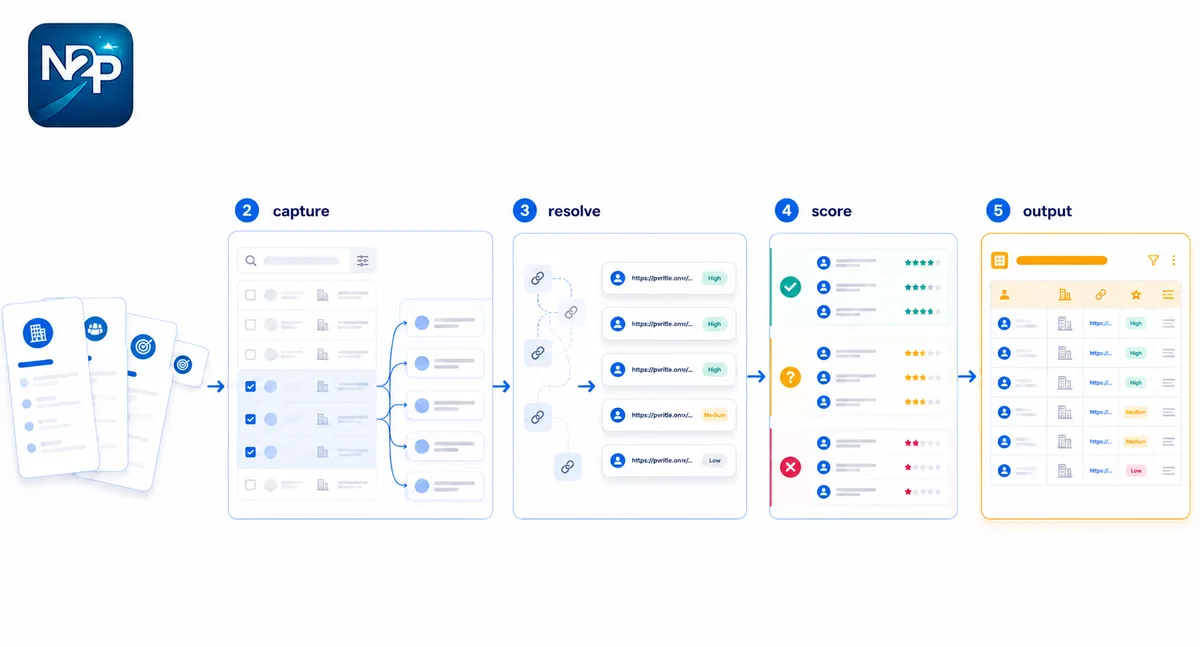
The fix isn't working faster. It's turning lead list building for agencies into a repeatable per-client pipeline: define each ICP once, capture lists instead of copying rows, resolve links in bulk, and let scoring do the first pass of qualification. This guide walks through that pipeline step by step — and it does it without scraping, without anything posted on a client's behalf, and without you holding any LinkedIn credentials you shouldn't.
The hidden cost of manual list-building for agencies
A single client's list feels manageable. The problem is repetition at agency scale. The same five-step grind runs for client A, then client B, then again next month when the campaign refreshes. None of it is billable, and most of it caps how many clients you can take on before you're forced to hire.
Here's the rough shape of where the minutes go on a list of around 1,000 leads, done by hand versus run through a systematized pipeline.
| Step | Manual, per client | Systematized |
|---|---|---|
| Pull search results | Scroll and copy, page by page | Capture the search you're already viewing |
| Get usable profile URLs | Open each lead, copy the public link | Bulk resolve to /in/ URLs |
| Dedupe and clean | Manual, error-prone | Handled in export |
| Qualify against the ICP | Read each profile, judge fit | Fast score sorts the whole list |
| Outcome | Hours of analyst time | Minutes plus review |
The systematized column is what the rest of this post builds. Every step below is read-only and user-triggered — you stay in control of what gets captured and when.
The manual workflow you're trying to kill
Before fixing it, name it. The typical hand-built list looks like this:
- Run a Sales Navigator search for a client's target titles, industries, and geographies.
- Open promising leads one at a time and copy their profile links.
- Clean those links, because the ones Sales Navigator gives you are the wrong kind.
- Dedupe against earlier lists so you don't pitch the same person twice.
- Read each profile and decide whether it's actually a fit.
Step three is the one that quietly eats the most time, and it's worth understanding why. When you copy a lead inside Sales Navigator, you get a link like linkedin.com/sales/lead/…. That URL is tied to a private, session-scoped lead ID — it only resolves inside a Sales Navigator session. Your CRM, your enrichment tools, and your outreach platform can't open it, so they reject it. What they need is the public linkedin.com/in/… profile URL. Converting between the two by hand means opening every lead and copying the public link manually, which is exactly the kind of repetitive work that doesn't scale across clients. (Our guide to building lead lists with verified profile URLs goes deeper on why verified URLs matter downstream.)
Step 1: Define each client's ICP once
The control layer for the whole pipeline is the ICP brief. You define a client's ideal customer one time — titles, seniority, functions, industries, geographies, company size, buying triggers, and disqualifiers — and that single approved brief then powers extraction, scoring, and message drafting for that client. You're not re-explaining "who's a good fit" at every step; the brief carries it.
A brief is generated from the client's website plus a LinkedIn profile, reviewed by you, and then approved. Approval matters: scoring and messaging only run against an approved brief, so the bar for "good fit" is something you signed off on, not a black box.
Managing many clients
One honest constraint to plan around: an account holds up to three active briefs at a time. For a small agency that maps neatly to three active clients. As clients churn or campaigns wrap, archive a brief to free a slot and rotate the next client in. If you're running more concurrent clients than that, the done-for-you service (covered at the end) is the cleaner path than trying to juggle briefs in and out.
Step 2: Capture scored lists, don't copy rows
This is where most of the manual time disappears. Instead of scrolling a Sales Navigator search and copying leads one by one, the Sales Navigator Extractor captures the search results you're already looking at and hands them back as a clean, structured list.
Two things matter here. First, it's read-only and you trigger it — there's no background process crawling LinkedIn on a timer, which keeps client accounts safe. Second, the captured rows can come back already scored against that client's ICP brief, so you're not exporting a raw dump and qualifying it later. You're exporting a list that already has fit attached.
Scored, not raw
That distinction is the whole point. A raw export is just a starting point for more manual work. A scored export tells you, at a glance, which rows are worth your analyst's attention — which feeds directly into the triage step below.
Step 3: Resolve lead links to CRM-ready URLs in bulk
For any leads that come through as Sales Navigator lead links, the Sales Navigator Resolver turns them into public /in/ profile URLs in bulk, so you skip the open-each-lead-and-copy step entirely. Each resolution comes with a confidence score from 0.0 to 1.0 so you can see how sure the match is, rather than trusting it blindly.
The bands are simple to act on:
- 0.90 and above — high confidence, send straight through.
- 0.70 to 0.89 — good, safe for most uses.
- 0.50 to 0.69 — review before you rely on it.
- Below 0.50 — low; treat as a flag, not a match.
For an agency, this is the step that most directly buys back hours. The worst manual task — manufacturing usable URLs one profile at a time — becomes a bulk operation with an auditable confidence score on every row.
Step 4: Triage with Fast scoring, confirm with Deep
Qualification is the last place agencies burn analyst time, reading profiles to decide who's worth pursuing. Lead scoring splits that into two passes so you only spend the expensive judgment where it counts.
| Fast score | Deep score | |
|---|---|---|
| How it works | Deterministic, rules-based match on the brief | LLM second opinion with rationale |
| Cost | 1 credit | 20 credits |
| Speed | Instant | Around 10–60 seconds |
| Returns | Score 0–100 and a verdict | Verdict, rationale, recommended action, confidence |
| Use it to | Triage the whole list | Confirm the shortlist |
The play for agencies: fast-score the entire captured list to sort it into strong, maybe, skip, and disqualified, then run deep scoring only on the strong tier you're about to put in front of a client. You get cheap triage across the volume and considered judgment on the few that matter. Fast scores cache for 24 hours per brief and URL, so re-checking inside that window costs nothing.
The repeatable per-client pipeline
Put together, the manual grind becomes a sequence you run the same way for every client:
- Approve the client's ICP brief — done once per client, then reused.
- Capture the relevant Sales Navigator searches with the Extractor.
- Resolve any lead links to public
/in/URLs in bulk, checking confidence. - Fast-triage the full list to separate fits from noise.
- Deep-score only the strong tier you intend to deliver.
- Hand off a clean, scored, CRM-ready list to outreach.
Because the brief is defined once and read by every step, the only per-list work left is the capture and a review pass. That's the difference between list-building that caps your client count and list-building that scales with it. There's no subscription holding you to a monthly minimum — a single shared credit pool covers every tool, and you spend it when you run a list.
Scaling past your own capacity
Some months the pipeline still isn't enough — an overflow client, a one-off volume spike, or more concurrent ICPs than three active briefs comfortably allow. Rather than hire ahead of the work, you can offload those lists to the done-for-you service, where a delivery team runs brief, capture, resolve, score, and enrich for you and hands back finished records.
Done-for-you is priced in cash per delivered record, completely separate from the self-serve credit pool — a base rate for a resolved and fast-scored record, with deep scoring, email, and phone as add-ons, charged only on delivery. For an agency, that turns capacity into a variable cost you can quote into a client engagement instead of a fixed payroll line.
Stop rebuilding lists by hand
Manual list-building doesn't scale because it repeats per client and stays non-billable. Define each ICP once, capture instead of copy, resolve in bulk, and let scoring carry the first qualification pass — and the grind turns into a pipeline you can run for every client without adding headcount. When volume outruns your team, hand the overflow to the people who do it full time.
See how done-for-you handles agency overflow and keep your team on the billable work.