Every account list is a bet about which companies are worth your reps' time. Firmographic data is what turns that bet from a hunch into a decision you can defend. It's the company-level equivalent of demographics — the stable facts about an organization that tell you, before anyone picks up the phone, whether this business even looks like the ones you already win.
The trouble is that most teams collect firmographic fields they never actually use, and skip the two or three that would have flagged a bad-fit account on day one. This guide covers what firmographic data really is, which fields change a sales decision, where to get them from public sources, and how to turn them into an account score — whether you build the list yourself or hand us the brief.
What firmographic data is (and isn't)
Firmographics describe the company: its industry, size, location, structure, and maturity. They're the account-level layer that sits underneath the person-level detail you gather later. A useful way to hold it: firmographics tell you which companies to pursue; contact and role data tell you who inside them to reach.
| Data type | Describes | Example |
|---|---|---|
| Firmographic | The company | Industry, headcount, revenue band, HQ region |
| Technographic | The company's tech stack | Uses a specific CRM or cloud platform |
| Contact / role | The person | Title, seniority, function, verified email |
| Intent | Current behavior | Researching a category this quarter |
Firmographics are the slow-changing, high-leverage layer. A company's headcount band or industry doesn't shift week to week, so scoring on it is stable and repeatable — which is exactly why it belongs at the front of your qualification, before you spend time on intent signals or personalized outreach.
The firmographic fields that actually change a decision
You don't need forty fields. You need the handful that map to how you actually win. Start from the companies that became your best customers and ask which shared traits predicted the win. In most B2B motions it comes down to a short list:
| Field | Why it decides fit |
|---|---|
| Industry / vertical | Determines whether your product's use case even applies |
| Employee count | Proxy for budget, complexity, and buying process |
| Revenue band | Signals ability to pay and deal size |
| HQ / operating geography | Serviceability, language, compliance, timezone |
| Company maturity / stage | Startup vs enterprise changes the whole sales cycle |
| Corporate structure | Subsidiary vs parent affects who actually buys |
The discipline is to write these down and weight them, not to hoard every attribute a data provider will sell you. A field you won't act on is a field that slows the list down. This is the same principle behind writing an ICP brief: capture your definition of a good-fit company once, as weighted criteria, so every list is built and scored the same way instead of by whoever happens to be sourcing that day.
Where firmographic data comes from
Firmographics live in public places — company websites, about pages, public registries, directories, and press. The work isn't finding them; it's turning scattered, inconsistent pages into structured fields you can filter and score. Done by hand, that's the slow part of building any target account list.
Turning a public company page into clean, structured firmographics is exactly what the Company Extractor is built to do: point it at public company sources and get back consistent fields — industry, size band, location, and the rest — ready to drop into a spreadsheet or your CRM, built to whatever brief you define. It's platform-neutral by design; it reads public web sources, not any one network. If you'd rather not run it yourself, the same job as a managed deliverable is lead data enrichment — you send the accounts, we append the firmographic fields and hand back a clean file.
One more sourcing reality: you'll often start with a list of people and need the company facts behind them, or the reverse. Connecting a person record to its firmographics — so a contact becomes an account you can score — is its own step, which is why profile-to-company mapping exists as a managed option when the volume is high.
Turning firmographics into an account score
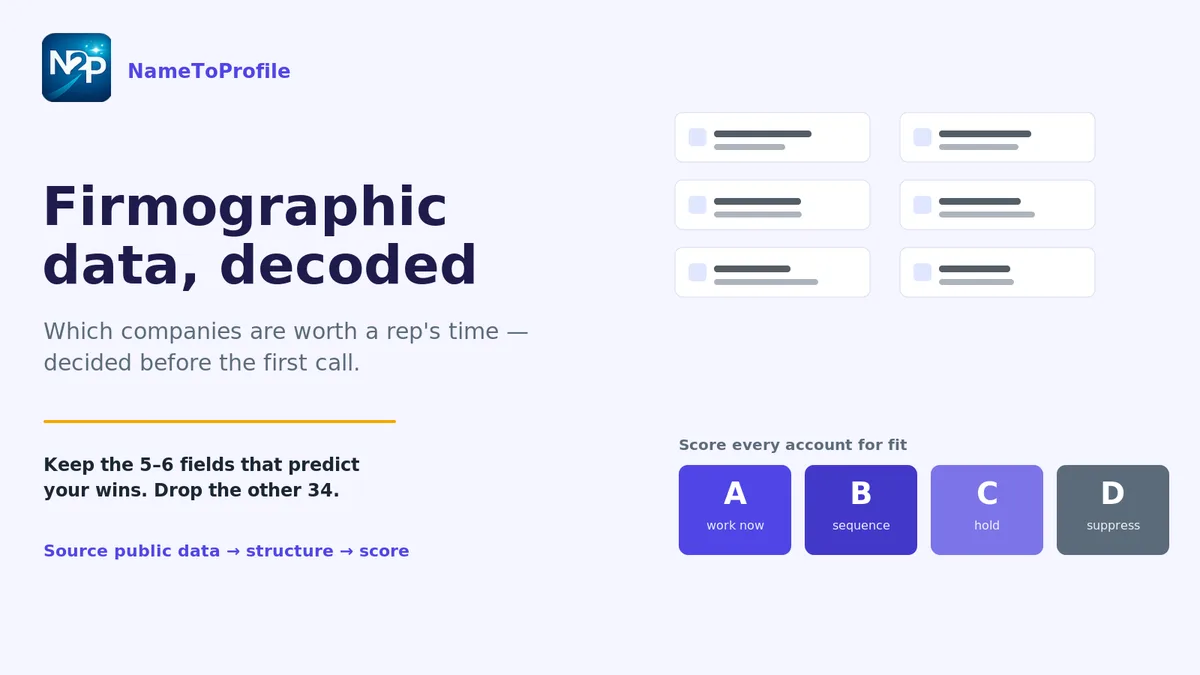
Collected fields don't do anything until they change what happens next. Translate your weighted criteria into a score on every account, so the list sorts itself into "work now," "work later," and "don't." A simple, transparent banding beats an opaque number nobody trusts:
| Band | Firmographic profile | Action |
|---|---|---|
| A — Strong fit | Clears every must-have field | Route to reps first |
| B — Medium fit | Must-haves met, weak on extras | Sequence, lighter touch |
| C — Weak fit | Misses a must-have | Nurture or hold |
| D — Disqualified | Hits a disqualifier (wrong industry, too small) | Suppress |
Running this as two speeds keeps it cheap: a fast, deterministic pass on structured fields to triage the whole list, and a deeper read only on the accounts that clear your must-haves. That two-speed account scoring means you never spend expensive analysis on a company a single rule could have rejected. And because the score is built from visible criteria, anyone can see why an account landed where it did — the verdict is auditable, so people actually use it. For the full account-list version of this workflow, see how to build a target account list for ABM without buying a static database.
Keep the data clean, or the score lies
Firmographic scoring is only as trustworthy as the fields under it. Inconsistent industry labels, duplicate companies under three spellings, and stale headcount bands all quietly corrupt the score. Standardize and dedupe before you score, not after — a good cleaning pass upstream saves every downstream number. If your raw list is messy, start with the routine in how to clean a messy lead list before it reaches your CRM, then enrich only the gaps that actually matter. That "enrich the real gaps, not everything" discipline is covered in what lead data enrichment actually fixes in B2B outreach workflows.
The short version
Firmographic data is the stable, company-level layer that tells you which accounts are worth pursuing before you invest in anyone. Pick the few fields that actually predict your wins, source them from public data into structured columns, score every account on visible criteria, and keep the inputs clean so the score stays honest. Build it yourself with the Company Extractor, or hand us the brief and get the list back done — either way, you stay in control of the definition.
Want to qualify your first account list against your own firmographic criteria? Start free with 100 credits — no card, no subscription.