"Acme Corp", "ACME Corporation", "Acme Corp." and "Acme (UK) Ltd" are one account and four CRM records. Nobody typed them wrong. They arrived from four sources — a form fill, an imported list, an enrichment append, and a rep's manual entry — and every one of them is defensible in isolation.
Company-name normalization is the process of collapsing those four back into one. It is unglamorous, it is entirely deterministic, and it is the single highest-leverage cleaning step in B2B lead data, because almost every downstream operation — deduplication, account routing, territory assignment, ABM matching, suppression lists — keys off the company.
It's also the step that most often has no owner. Name standards sit awkwardly between the team that buys the data and the team that lives in the CRM, which is why RevOps ends up holding the rule in most organisations.
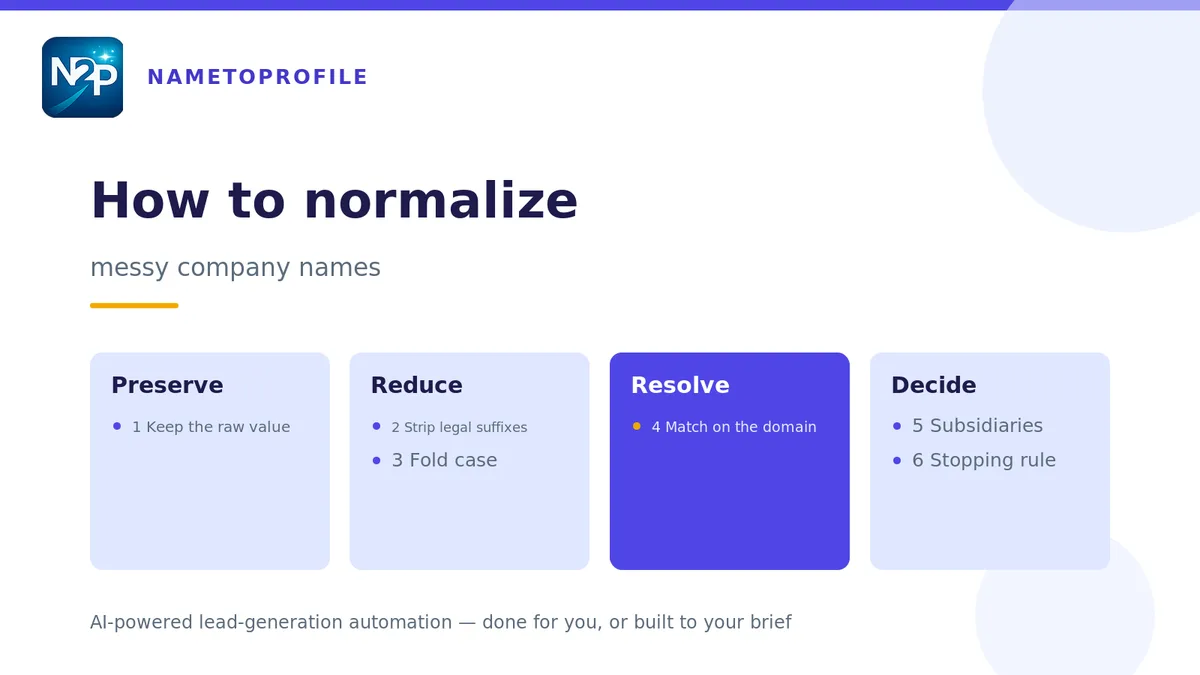
Here is the six-step procedure, in the order you should run it.
Step 1 — Keep the raw value before you touch anything
Before any transformation, copy the original string into a company_name_raw column and never write to it again. Every subsequent step writes to a separate company_name_normalized field.
This sounds like bookkeeping and it is the step that saves you. Normalization is lossy by design, and the first time a match looks wrong you will need to see what the source actually said. Teams that overwrite in place discover this after the overwrite, which is to say too late.
Step 2 — Strip legal suffixes and entity forms
Remove the corporate form from the end of the string: Inc, Inc., Incorporated, LLC, L.L.C., Ltd, Limited, PLC, GmbH, S.A., B.V., Pty, Pte, AB, AS, Oy, SARL, and the rest of the international set your market touches.
Two rules keep this safe. Strip only at the end of the string, so "Limited Brands" survives intact. And keep a hand-maintained exception list for companies whose legal form is genuinely part of the brand — you will find two or three, and they will be the ones your biggest customers work at.
Step 3 — Fold case, punctuation and whitespace
Now flatten the cosmetic variation. Lowercase everything, collapse repeated whitespace, strip trailing punctuation, and normalise the characters that have multiple encodings — curly versus straight apostrophes, en-dashes versus hyphens, non-breaking spaces that arrived from a paste.
Handle ampersands explicitly rather than incidentally: pick either "and" or "&" as your canonical form and convert everything to it. "Johnson & Johnson" and "Johnson and Johnson" must land on the same string or the whole exercise fails at the last hurdle.
| Raw value | After step 2 | After step 3 |
|---|---|---|
| ACME Corporation | ACME | acme |
| Acme Corp. | Acme | acme |
| Acme (UK) Ltd | Acme (UK) | acme uk |
| Johnson & Johnson Inc | Johnson & Johnson | johnson and johnson |
| Müller Holding GmbH | Müller Holding | muller holding |
Steps 2 and 3 together resolve the large majority of duplicates in a typical list. Everything after this handles the remainder — which is where the interesting failures live.
Step 4 — Match on the domain, not the string
This is the step that changes the outcome. Once you've normalised the string, stop using it as the match key and resolve each record to a company domain instead.
The reason is that string matching cannot solve the cases that matter: trading names that differ from legal names, rebrands, acquisitions, and abbreviations ("IBM" and "International Business Machines" share no useful substring). Domains survive all four, because the domain is a registered identifier and the name is a label.
Resolving name to domain means going to public sources rather than pattern-matching. Structured company data pulled from public sources gets you the domain plus the firmographic attributes in the same pass, which is more useful than the domain alone. Where you're working from people records rather than company records — a list of names and employers — mapping each profile to the right company record is the same problem approached from the other end, and it's the one that decides whether your account-level reporting is trustworthy.
Once domains are attached, make the domain your primary key and demote the normalised name to a display field. Every dedupe, routing and suppression rule should read the key, not the label.
Step 5 — Decide subsidiaries deliberately
Do "Acme UK" and "Acme GmbH" roll up to Acme, or stay separate? There is no universally correct answer — there is only a decision you make once and apply consistently.
Roll them up when you sell centrally, report at global-account level, and one relationship covers the group. Keep them separate when buying decisions are local, territories are assigned by country, or the entities genuinely run independent procurement.
Whichever you choose, store both: a parent_domain and an entity_domain. Teams that pick one and discard the other spend the following quarter reconstructing the discarded one from memory. Two columns cost nothing and let reporting roll either way.
Step 6 — Set a stopping rule, then stop
Fuzzy matching is where normalization projects go to die. Edit-distance and token-similarity scoring will keep finding candidate matches forever, and past a certain threshold they start merging genuinely different companies — which is far more damaging than leaving two records unmerged.
Set the rule in advance: auto-merge above a high-confidence threshold, queue for human review in the middle band, leave alone below it. Then measure the merge queue for a fortnight and adjust once. Do not adjust weekly; you'll be tuning noise.
Accept a residual. In most real lists a small percentage of records will not resolve cleanly, and the correct treatment is to flag them rather than force them. A flagged unresolved record is honest; a wrongly merged one is a silent error that surfaces in front of a customer.
What normalization exposes
Running these six steps usually reveals two things at once. The first is that the duplicate rate was higher than anyone estimated — collapsing on domain routinely removes a meaningful share of a list. The second is that once records are correctly merged, the field gaps become obvious: three partial records combining into one still-incomplete record.
That second finding is the useful one, because it's now a specific, addressable list of missing fields rather than a vague sense that the data is poor. Filling those gaps — appending the firmographics or contact attributes that no source had complete — is a separate enrichment pass, and it's far cheaper to run after matching than before, since you're no longer paying to enrich the same account three times.
Normalization is also one of several passes a list should go through before it reaches a CRM; the full pre-CRM cleaning sequence covers the others, and firmographic field definitions are worth settling before you start, since they determine what "the same company" even means for your segmentation.
Running it once versus running it always
A one-off cleanup fixes today's list and nothing else. New records arrive continuously from forms, imports and enrichment appends, and within a quarter the same four spellings are back.
The durable version is a rule set applied at the point of entry — the same six steps, run automatically as records arrive. If you'd rather have the rules built to your specification and run for you, that's what managed data cleaning covers, and where the matching logic needs to be specific to your market, custom tooling built to your brief is the alternative to bending a generic rule set into shape.
Either way the ownership question comes back: a rule nobody owns stops being applied within two quarters, whatever tooling enforces it.
Start free with 100 credits — no card, no subscription — and run the six steps against a slice of your own list to see what your real duplicate rate is.